When you're done you'll have:
You'll hand us both by pasting them into the secure setup link we emailed you. We never see or type your credentials — they go straight into your own encrypted workspace.
Part 1 · Create your Telegram bot
Your agent talks to you through Telegram — a free, secure messaging app. You'll create a private bot, and that bot becomes your primary agent — the AI teammate you'll message every day to get work done.
Step 1 — Install Telegram (skip if you already use it)
On your phone (easiest): install Telegram and sign up with your phone number.
Signing up on your phone first is simplest.
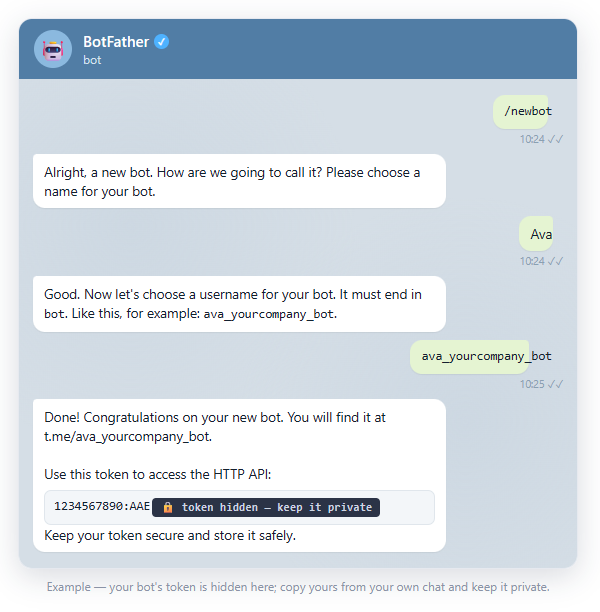
Step 2 — Create the bot with BotFather
- In Telegram, search for
@BotFather(the official blue-check account) and open the chat. - Send
/newbot. - When asked for a name, type the real name you're giving your agent (e.g. Ava, Max, Remy) — this is what it's called when you chat with it.
- When asked for a username, choose something unique that ends in
bot(e.g.ava_yourcompany_bot). - BotFather replies with a token — a long string like
1234567890:AAExampleTokenDoNotShare.
Step 3 — Lock the bot down to just you (required)
Your bot is created, but not yet secured. These steps are required — they make sure only you can ever talk to your agent.
- Message your new bot once (send it
hello). This ties the bot to your Telegram account: from that point on it only accepts messages from you, and silently ignores anyone else who finds it. (We apply this lock automatically — you don't configure anything.) - Tighten the bot's privacy in
@BotFather(both required):/setprivacy→ pick your bot → Enable — so the bot can't read ordinary chatter, only messages meant for it./setjoingroups→ pick your bot → Disable — so the bot can't be added to any group chat.
Together these keep your agent private and one-on-one with you — no groups, no other people.
That's Part 1 done. ✅
Part 2 · Set up your Claude access
Your agent's "brain" runs on Claude (by Anthropic). Two steps: get the right plan, then generate a setup token.
Step 1 — Get a Claude Max plan
Go to claude.ai, sign up (or sign in), and subscribe to the Claude Max plan.
Step 2 — Generate your setup token
This uses your computer's built-in command line — no extra software to install, just two commands, and we're happy to hop on a quick call and do it with you. Pick your computer:
- Open Terminal. Press ⌘ + Space, type Terminal, press Return.
- Install Claude. Copy-paste this and press Return (~30 seconds):
curl -fsSL https://claude.ai/install.sh | bash - Generate your token:
Your browser opens — sign in to Claude and approve. Back in Terminal you'll see a token starting withclaude setup-tokensk-ant-oat…
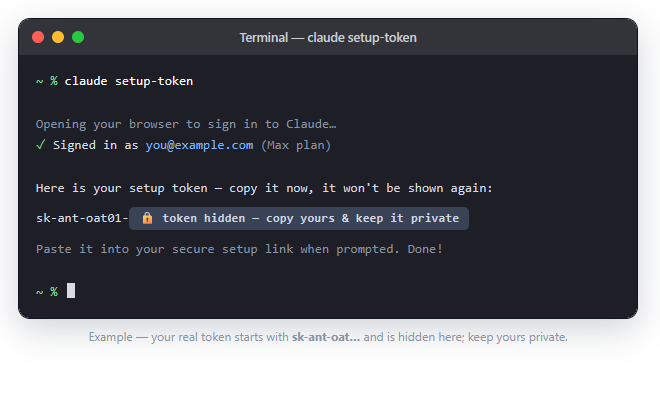
sk-ant-oat… token and keep it private, right next to your Telegram token.That's Part 2 done. ✅
Part 3 · Hand it to us — securely
Open the secure setup link from your welcome email (it's private to you and expires in 72 hours) and paste in:
- ✅ your Telegram bot token (from Part 1)
- ✅ your Claude setup token (from Part 2)
Submit, and you're finished — we take it from there and build your workspace. We never see your tokens; they're encrypted straight into your own instance.
Need a hand?
Totally normal to want help with the token step — just reply to your welcome email and we'll jump on a short call and do it together.